Campaign Management Templates: From Initiative Tracking to Progress Management
Published:
Last Updated:
Category:
Published:
Last Updated:
Category:
Authors: Shusaku Yosa
Every time you write a campaign brief from scratch, you struggle to remember the format you used last time. Progress trackers vary from person to person. The post-campaign report layout changes every round—this silent "reinventing the wheel" steadily erodes marketing team productivity.
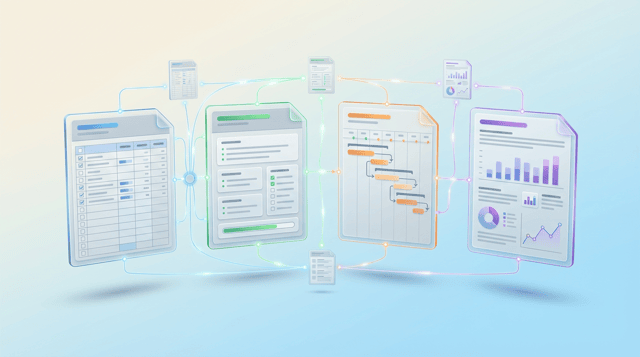
This article introduces the essential campaign management templates, organized into four types: Initiative Tracker, Campaign Brief, Schedule & Progress Tracker, and Post-Campaign Review Report. We walk through the components, usage, and operational tips for each. At the end of the article, you will find a downloadable template set you can start using immediately.
The greatest value of templates is transforming campaign management from individual expertise into organizational infrastructure. By codifying the thinking steps that veteran marketers perform instinctively, anyone who takes on a campaign can maintain a baseline level of quality. This also mitigates the risk of knowledge loss when team members transfer or leave.
With templates in place, you no longer need to think about what decisions to make each time you start a new campaign. The required fields for a brief, the structure of a progress tracker, and the metrics to include in a report are all predefined—so you can focus on filling in the substance rather than building formats. This speed advantage compounds significantly when running multiple campaigns in parallel.
Campaign data recorded in a consistent format enables easy cross-comparison. Questions like "What was the CPA in the last lead-gen campaign?" or "How has reach trended across awareness campaigns?" can be answered instantly by referencing past reports. Without standardized templates, extracting historical data takes time every round, causing post-campaign reviews to become superficial.
The initiative tracker is the "command center" template that lists all campaigns running in a given quarter or half, supporting prioritization and resource allocation decisions. Before diving into individual campaign management, use this tracker to establish a bird's-eye view of what is currently running and what comes next.
The initiative tracker should include the following fields: Campaign ID (a unique identifier following a unified naming convention), campaign name, objective (awareness, lead generation, revenue, retention, etc.), funnel stage (awareness, interest, consideration, acquisition, retention), primary channel, target segment, key KPIs and targets, budget, campaign period, owner, and status (planning, in progress, completed, cancelled).
Standardizing the campaign ID naming convention is critical. For example, using a pattern like "Year-Quarter-Sequence-Abbreviation" such as "2026-Q2-001-LeadGen-Webinar" maintains consistency across ad platforms, GA4 UTM parameters, and MA tool campaign tags.
The most important principle is never to treat the tracker as a one-time exercise. Open it at every monthly marketing review to update statuses and reassess priorities. Establish a rule that new campaign additions and cancellation decisions are also made in this forum to prevent initiative sprawl. If using a spreadsheet, conditional formatting for status color-coding dramatically improves readability.
The campaign brief is the "blueprint" for an individual campaign. It consolidates everything decided during the planning phase onto a single document, creating a shared foundation for all stakeholders. Without a brief—or with a vague one—creative direction drifts and major rework at the approval stage becomes a real risk.
A campaign brief should include the following sections. First, "Background and Objective" explains why the campaign is being run and which business KGI it supports. Next, "Target" defines the persona or segment. "Core Message" articulates the overarching value proposition in one to two sentences. "Channels and Tactics" describes the channels to be used and the specific activities on each.
Additionally, "KPIs and Targets" lists no more than three primary KPIs. "Budget" shows the total and a channel-level breakdown. "Schedule" outlines milestones and key deadlines. "Team and Roles" names the project owner, contributors, and approvers. Finally, "Definition of Success" spells out exactly what outcome would make this campaign a success.
Rather than perfecting the brief before sharing, circulate a draft for stakeholder review early. Incorporating feedback from sales and product teams at an early stage dramatically reduces rework during execution. Also, keep the brief to one to two pages—if it is too long, no one reads it and it loses its purpose.
The schedule and progress tracker visualizes "who does what by when" during the execution phase. By decomposing the plan from the brief into concrete tasks and tracking progress daily or weekly, you enable early detection and resolution of delays.
Organize the tracker into sections by phase (planning, production, approval, delivery, monitoring, review) and list tasks under each. Each task should have a task name, owner, start date, deadline, status (not started, in progress, awaiting review, completed), dependency (tasks whose completion is a prerequisite), and notes.
If using a spreadsheet, a Gantt-chart format that visualizes timelines makes team-wide alignment easier. With project management tools like Asana, timeline or kanban views offer equivalent functionality.
Explicitly build the approval workflow into the progress tracker. Visualize approval steps as tasks—for example: copy draft, copy review, design production, design review, legal check, final sign-off, ad submission. Assign an approver and a deadline to each step, and factor expected revision rounds into the schedule buffer for a realistic plan.
Keep the tracker at a granularity that can be updated in five minutes a day. Tasks that are too granular add update overhead and lead to abandonment; tasks that are too coarse make progress invisible. As a rule of thumb, each task should take one to three days to complete. Routinely screen-sharing this tracker at the start of weekly progress meetings to update statuses and surface issues helps embed the habit.
The post-campaign review report records results and learnings to feed into the next campaign. It is a mechanism that converts tacit knowledge into explicit knowledge and is arguably the most important document for building organizational marketing capability. A standardized report format also makes cross-campaign comparison and trend analysis straightforward.
Structure the report in five sections. First, "Campaign Overview" summarizes the brief (objective, target, channels, period, budget). Second, "KPI Results Summary" presents targets, actuals, and achievement rates in a table. Third, "Channel and Creative Breakdown" analyzes which channel or tactic contributed most to results and where bottlenecks occurred.
Fourth is "KPT (Keep, Problem, Try)." List three to five items for what to maintain, what to fix, and what to test next. Finally, "Next Actions" documents specific improvement measures with assigned owners and deadlines.
We recommend structuring the KPI summary table with five columns: metric name, target, actual, achievement rate, and change vs. previous campaign. Limit primary KPIs to three and lead with the conclusion. For example: "Target CV count of 200 vs. actual of 243—121% achievement. CPA improved 20%, coming in at $64 against a $80 target." Reserve detailed channel-level data for the next section; the summary should prioritize clarity at a glance.
Set a rule to complete the review report within one week of campaign end. Memories fade with time, and qualitative learnings are lost. The report only delivers value when paired with a team sharing and discussion session. Schedule a 30-minute review meeting and use it to collaboratively deepen the KPT findings.
Each of the four templates is useful on its own, but they deliver full value when linked together. The initiative tracker decides which campaigns to run, the brief designs each campaign, the progress tracker controls execution, and the review report captures learnings. When this flow operates as a single cycle, campaign management quality improves with every iteration.
The glue that binds the four templates is the campaign ID. Carry the ID assigned in the initiative tracker into the brief, progress tracker, and review report. Furthermore, reflect this ID in GA4 UTM parameters (utm_campaign), ad platform campaign names, and MA tool campaign tags so that template-level management data and actual performance data connect seamlessly.
Trying to roll out all four templates at once risks high operational overhead and low adoption. Start with the template that addresses your biggest campaign management bottleneck, stabilize it, then add the others incrementally. For example, if superficial reviews are the pain point, begin with the review report, then layer in the brief, progress tracker, and initiative tracker over time.
Organizations that succeed with templates share a common trait: they treat templates not as static formats but as living documents that evolve through use. Review the templates themselves each quarter, incorporate feedback like "this field is never actually used" or "we need a field for X," and update accordingly. Think of it as running a PDCA cycle on the templates themselves.
Over-engineering templates with too many fields turns completion into a burden and causes adoption to collapse. Templates should aim for "minimum fields, maximum impact." When in doubt, lean toward fewer fields and only add more once a genuine need is confirmed—adoption sticks far more easily that way.
When templates live in individual local folders or are shared as email attachments, "where is the latest version?" becomes a recurring problem. Designate a single location in shared cloud storage or a documentation tool like Notion as the canonical template repository. Maintain version history so you can always revert to earlier versions if needed.
Templates are a means to an end—the goal is maximizing campaign results. Sometimes people focus so much on completing every field that the exercise becomes perfunctory. A KPT section filled with "nothing to note" is a telltale sign. Share with the team why each field exists and ensure everyone understands the intent before operationalizing the templates.
Campaign management templates are a foundational tool for simultaneously boosting your marketing team's productivity and output quality. This article covered four templates: Initiative Tracker, Campaign Brief, Schedule & Progress Tracker, and Post-Campaign Review Report. Each delivers standalone value, and linking them via a campaign ID creates an end-to-end campaign management system from planning through review.
The key is to avoid perfectionism at the outset—start small with the template that matches your most pressing challenge and grow from there. Treat the templates as living documents that you update regularly.
We have prepared all four templates introduced in this article in a ready-to-use spreadsheet format. Download them from the form below.
Find more of our articles on Google

How to design a marketing team's task management so work doesn't get trapped with one person. Covers where knowledge sil...

The ten columns a campaign progress tracking sheet needs, and the weekly cycle that keeps it updated. Covers who updates...

Marketing progress tracking breaks down when tasks and budget live in separate systems. Learn four steps to tie them tog...


