How to Build an HTML Email | Design Examples and Free Templates
Published:
Last Updated:
Category:
Published:
Last Updated:
Category:
Authors: Shusaku Yosa
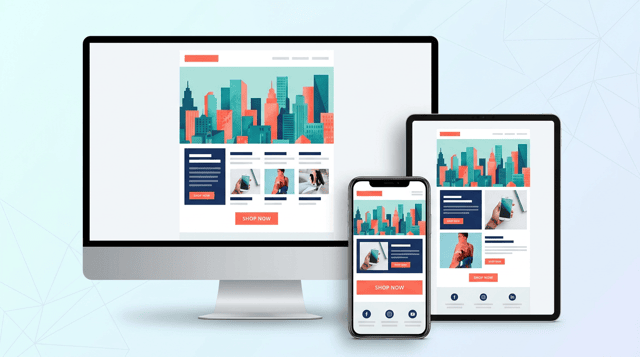
An HTML email is a rich-format email built with images, styling, buttons, and brand colors. It is widely used in business contexts—newsletters, promotional campaigns, transactional emails, welcome emails, and more. Compared with plain-text email, it has far stronger visual appeal, and its impact on click-through rate and purchase behavior is much easier to measure.
This article explains what an HTML email is, how it differs from plain text, a 5-step process for creating one, design examples by industry and goal, free templates and tools you can use, what you must watch out for to avoid the spam folder, and operational tips for lifting open and click rates—organized so you can apply it on the job. It is written for first-time HTML email senders as well as marketers who want to improve the performance of an existing program.
An HTML email is an email that is styled and laid out using the same HTML (HyperText Markup Language) and CSS that power web pages. You can freely arrange text colors, fonts, images, buttons, and tables, and align the design with your brand tone. It is the format of choice whenever visual messaging drives results—email newsletters, campaign announcements, post-purchase thank-you emails, automated email-marketing flows, and more.
The biggest characteristic of HTML email is how easy it makes capturing behavioral data: opens, clicks, and conversions. Because you can track banner image clicks and the CTRs of in-body buttons, A/B testing and improvement cycles run smoothly, which makes HTML email a high-leverage digital marketing channel.
The differences between HTML email and plain-text email go far beyond visual freedom—they also include file size, deliverability, measurement capabilities, and operating costs. The main contrasts are as follows.
In practice, the rule of thumb is to use HTML email for sends focused on brand experience, visual appeal, and CTR or revenue optimization, and plain text for system notifications and trust-critical transactional messages.
Even with the spread of social media and chat tools, HTML email remains a critical marketing channel for both B2C and B2B businesses. The reason is simple: email is one of the few owned channels where you can reach your audience directly, without depending on a platform algorithm. It does not depend on advertising spend, and it lets you build long-term customer relationships as a stock asset.
The starting point for an HTML email is not design or coding—it is articulating, in words, who the email is for, what it is meant to achieve, and what success looks like. Skip this step and you'll end up with emails that look fine but never move the needle. Write the goal in a single sentence, and connect it to a target KPI before you do anything else.
Once goals and KPIs are clear, the direction of your subject line, the way you present the first view, and the design of the CTA button all line up coherently. In the entire build process, the first 30 minutes spent on this step matter the most.
Next, sketch the structure and copy at a rough level. Readers skim from the top down, so the make-or-break moment is whether the first view (what's visible immediately after opening) communicates the benefit. A typical HTML email is a vertical layout, and the following structure is the standard.
On the copy side, prioritize using just three places—subject line, preheader, and first view—to fully convey both the reason to open and the value of reading on. Short headings, bullet lists, and a single focused CTA produce more reliable response than long explanatory paragraphs.
Once the wireframe is set, move on to coding. HTML email is not the same as a web page: each email client (Gmail, Outlook, Apple Mail, Yahoo! Mail, mobile apps, and more) supports very different subsets of HTML and CSS. The rule is to write it in the conservative "old-school" style intended for email, not the latest web standards.
A minimal HTML email built around a table layout looks like the following. Use it as a base you can copy and adapt.
unknown nodeHTML email is a channel where "send first, fix later" is extremely costly. Before you broadcast, check how it actually renders in at least the major clients. Even just an internal test send catches the majority of unexpected layout issues.
Paid testing platforms such as Litmus or Email on Acid let you check a far wider range of environments at once, but a test send to your own phone, desktop, and a few colleagues already covers most of the ground. Also confirm that the email still makes sense with images turned off, and that every link works as expected.
Sending is not the finish line. Treat measurement and improvement as part of the same loop, and your HTML email program becomes a compounding asset. After every send, record at minimum the open rate, click rate, conversion volume, and unsubscribe rate, and form your next hypothesis around three levers: subject line, first view, and CTA.
For B2C e-commerce in apparel, beauty, food, and similar verticals, the standard pattern leads with a hero visual that conveys the brand world and arranges product cards in a grid. Visual impression heavily drives click-through, so photo quality, consistency, and a tightly controlled brand palette matter.
For B2B SaaS and services, clarity outweighs flash. Keep the hero visual to an abstract illustration or a key-color band, and structure the body around the flow problem → solution → CTA so it reads as a logical argument. The reader is a decision-maker scanning between meetings, so a layout that surfaces the key points on a single read works best.
Weekly or monthly newsletters work best when they are organized like a magazine table of contents, presenting several topics in one issue. When you want to deliver multiple stories in a single email, structure it with an opening table of contents and clear section dividers so readers can choose what to read.
Welcome emails sent right after sign-up, and transactional emails such as purchase or booking confirmations, are touchpoints where reader expectations are high and open rates run unusually high. A restrained, trust-building layout that surfaces the logo, the registered details, and the next clear action is the right pattern.
You don't have to code from scratch. Free HTML email templates are widely available and let you produce high-quality emails in a fraction of the time. The main sources are:
When you choose a template, always confirm three things: that it is responsive, that it has been tested in the major email clients, and that the CSS is inlined. Older templates can break in current versions of Gmail or Outlook.
HTML email tools fall broadly into three groups: drag-and-drop editors, code-first tools with live preview, and tools that generate HTML from Markdown or a custom syntax. Pick one that fits your team's skill set, send volume, and operating workflow.
When choosing, compare options on four axes: (1) integration with the email service you actually send through, (2) how template assets accumulate over time, (3) whether the operator is technical or not, and (4) your future plans for segmentation and automation. Holding to those four prevents wandering decisions.
Even with a free template, some baseline customization to fit your brand and per-client testing are non-negotiable. Sending the template as-is creates a sender impression that feels off-brand and undermines the experience after the open.
Even a beautifully crafted HTML email is invisible if it lands in spam. Spam filtering is a holistic judgment by the receiving system, influenced by three things: technical setup, message content, and sending history. On the technical side, make sure sender authentication—SPF, DKIM, and DMARC—is set up correctly.
Most jurisdictions impose specific rules on commercial email (in Japan, for example, the Act on Specified Commercial Transactions and the Specified Email Act apply). Violations can bring penalties as well as serious brand damage, so put a checklist in place before you start sending.
More than half of HTML email opens now happen on smartphones, so mobile optimization is no longer optional—it is a baseline requirement. Tiny font sizes, hard-to-tap buttons, or layouts that fall apart with images disabled cost you readers immediately. At the same time, design for accessibility, not just for sighted users in ideal conditions.
The first hurdle is getting opened. The inbox shows only three things—subject line, sender name, and preheader—so you have to use that small window to make the reader feel "this is worth my time." Aim for around 20 characters in the subject line (longer in English, but still concise), and lead with a benefit or a concrete number.
Once the email is open, communicating the gist within the first view drives both click rate and bounce rate. Readers decide "keep reading or close" within one or two seconds, so place your main message and primary CTA as high in the layout as you can—above the fold whenever possible.
Sending the same content to your whole list is the fastest way to plateau on open and click rates. Splitting your audience by attribute, behavior, or purchase cycle, and adjusting both the content and the subject line accordingly, lifts response sharply on the same list. Once you add a marketing automation tool, scenario-based delivery falls into place.
Make the most of HTML email's biggest advantage: the ease of capturing data. Beyond the per-send open rate, click rate, and conversion count, the long-run knowledge comes from accumulating learnings on send timing, subject-line patterns, and segment-level response. Pairing this with a web analytics platform such as GA4 lets you visualize how email contributes to traffic and revenue.
HTML email combines real expressive power—images, styling, and buttons—with the quantitative discipline of measurable opens, clicks, and conversions. It is one of the most important marketing channels available today. The build process can be organized into five steps: define goals and KPIs, design the wireframe and copy, code with inline CSS and table layouts, test across multiple clients, and measure and improve after sending.
On the design side, the key is choosing the right layout pattern—visual-led, information-led, editorial, or trust-led—based on your industry and goal. Free templates and tools let you reach high quality with limited initial cost, but spam-folder defenses, legal compliance, and mobile optimization are non-negotiable. In the end, what produces results is not aesthetic alone—it is the operational discipline of testing the subject line, first view, CTA, and segmentation week after week. Use the five steps and design patterns in this article as a base, and revisit your email marketing program from the design phase up.
Find more of our articles on Google
A guide to web marketing strategy through the role division and combination of channels (the channel mix)—SEO, web adver...
Organizes the purpose of an owned media into three—"customer acquisition / lead generation," "branding," and "recruitmen...

Web marketing is the activity of using the web to attract customers and drive outcomes. This article explains, in a begi...


