What Is a Step Email? Scenario Design and Success Stories
Published:
Last Updated:
Category:
Published:
Last Updated:
Category:
Authors: Shusaku Yosa
A "step email" is an email marketing technique that automatically delivers a series of pre-prepared emails along a defined scenario, triggered by a specific action taken by a prospect or existing customer. Triggered by actions such as a whitepaper download, account registration, first purchase, or free trial signup, step emails deliver information that matches the recipient's evaluation stage at the right moment, leading to qualified opportunities, purchases, and repeat orders.
This article explains what step emails are, how they differ from newsletters and scenario emails, the steps for designing scenarios that drive results, industry-specific scenario examples and success stories, operational caveats, and KPIs for measuring effectiveness — all from a practitioner's perspective. It is intended both for marketers who are starting with step emails and for experienced practitioners working to improve performance.
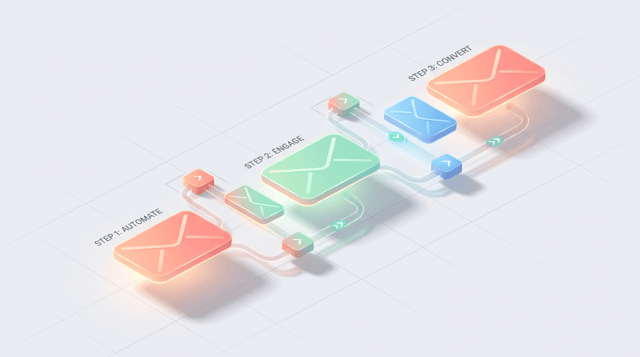
A step email is a marketing technique that automatically sends a series of emails in a predefined order, based on a scenario triggered by a specific user action. For example, you might design a flow where a prospect who downloads a whitepaper receives a thank-you email one day later, a related case study three days later, a product introduction seven days later, and a trial invitation 14 days later. Once configured in your email tool, this entire sequence runs automatically.
The biggest characteristic is that step emails are designed as a "line" of communication rather than a single touch. Instead of treating each email as a self-contained message, step emails layer information progressively along the customer's psychological journey — awareness, interest, evaluation, action — gradually warming the lead. Because open rates, click rates, and conversion rates can be measured for every email and the entire flow can be improved through PDCA cycles, step emails are widely used in both B2B and B2C as a highly repeatable lead nurturing tactic.
Step emails and newsletters are both email-based communication tactics, but they differ significantly in purpose and delivery logic. A newsletter takes a "point" approach, broadcasting the same content to all subscribers at the same time. It works well for time-sensitive information such as updates, campaign announcements, or seasonal messages.
Step emails, in contrast, take a "line" approach: triggered by a user action, they send multiple messages based on the elapsed days since each individual user's trigger event. Two people who enter a step email flow on different dates will receive the same emails on their own schedule. This makes step emails particularly suited to long-term relationship building, such as nurturing new prospects, post-purchase follow-up, or reactivating dormant customers. The two approaches are not mutually exclusive — combining them based on purpose maximizes results.
Step emails are often confused with "scenario emails." In a step email, the trigger is the starting point and emails are delivered along a single timeline based on elapsed days. A scenario email goes further: it branches based on signals such as opens, link clicks, page views, or score thresholds, sending different sequences to different users. This is a more sophisticated design.
In practice, the realistic approach is to first build a successful pattern with a simple step email, accumulate performance data, and then add behavior-based branching to evolve into scenario emails. Designing complex branching from the outset makes it difficult to evaluate effectiveness, so starting small is essential.
B2B products typically have long evaluation cycles and multiple stakeholders, so a single touchpoint rarely closes a deal. By delivering information to leads acquired through whitepapers or webinars in a logical order — industry challenges, solution approach, case studies, product introduction, trial invitation — you can gradually warm leads to a hot state.
Even when sales reps cannot manually follow up on every lead, step emails maintain consistent touchpoints automatically and contribute to higher opportunity creation rates. When combined with marketing automation, you can design a flow that hands off only leads whose scores reach a certain threshold to sales.
On EC sites, step emails are commonly built around the purchase cycle: a welcome email after registration, a thank-you email after the first purchase, a review request when the product arrives, and a reminder for repeat purchases. Follow-up to first-time buyers in particular has a direct impact on second-purchase rates. For consumable products such as cosmetics or supplements, retention messaging timed to when the product is likely to run out is highly effective.
In SaaS, an onboarding step email triggered by free trial signup or paid plan activation is a standard play: initial setup guide, key feature how-tos, usage tips, and an upgrade proposal. Because product adoption during the trial period directly drives paid conversion, the design should ensure users never wonder "what should I do next."
For webinar registrants, a sequence of step emails — pre-event reminders, a thank-you and recording link after the event, related materials, and an invitation to a one-on-one consultation — is highly effective. By branching between attendees and no-shows and offering each group an appropriate next step, you can prevent missed opportunities and drive more conversations.
The biggest benefit of adopting step emails is the ability to automate communication tailored to each customer's evaluation stage at a scale and consistency that manual operations cannot achieve. Once a scenario is designed, every new registrant receives the same quality of follow-up around the clock, simultaneously improving operational efficiency and preventing missed opportunities.
In addition, because open rates, click rates, and conversion rates are measurable for each email, you can identify which messages resonate at which timing and run a data-driven improvement cycle. Step emails make "who, when, and what to send" continually optimizable through data.
On the other hand, step emails require significant effort for scenario design and content production. Each email needs a clear purpose, body copy, send timing, and matching landing pages — all designed as a coherent set. Weak design causes recipients to perceive the messages as just "emails that keep coming," leading to unsubscribes.
Also, because the schedule is fixed in advance, step emails are not well suited to time-limited campaign announcements or breaking news. Furthermore, since all users follow the same schedule, optimization is harder when the audience has very different evaluation paces. In such cases, consider extending into scenario emails that branch based on behavioral data such as opens and clicks.
The performance of a step email is determined more by the quality of "scenario design" than by the features of the email tool. Below is a standard 5-step approach to scenario design that anyone can follow without confusion.
Start by clarifying the ultimate goal you want the step email to achieve. Set a concrete KGI that ties to business outcomes — for example, "qualified opportunities from whitepaper downloads," "trial-to-paid conversions," or "second purchase among first-time buyers." Defining KPIs such as open rate, click rate, and step pass-through rate alongside the KGI makes improvement actions easier to identify.
Next, define the target persona and the customer journey from awareness to action — awareness, interest, evaluation, decision. List the questions, concerns, and uncertainties that arise at each stage and articulate what the customer needs to know and what will tip the decision in your favor. These insights become the themes of each email.
Decide on the user action that will serve as the trigger (whitepaper download, member registration, first purchase, etc.) and design the path to the goal as a story. Rather than designing a long sequence from the outset, start with a simple flow of three to five emails from trigger to goal. Adjust the number of emails based on the product's evaluation cycle and price point.
Choose the send interval based on product characteristics and the user's decision speed. As a general guideline, three to seven emails with one- to three-day intervals work well. Low-cost, fast-decision products call for tighter, more concentrated delivery within a few days, while high-priced B2B products with long evaluation cycles benefit from a longer cadence spanning weeks or months. Start with one- or two-day intervals and tune based on data.
Finally, write the subject, body, and CTA (the next action you want the recipient to take) for each email. Each email should have a clear single role, and CTAs should be limited to one per email. Open with a sentence that signals what the reader will get, focus the body on a single theme, and end with a button or link that nudges the next step. After launch, review open and click rates weekly and run continuous A/B tests on subject lines, CTAs, and send times.
Here is a typical scenario for a B2B SaaS company. To leads who downloaded a whitepaper, send a thank-you and related content one day later, an article on industry challenges and solution approaches three days later, a peer customer case study seven days later, an introduction to the product's key features ten days later, and an invitation to a free trial or one-on-one consultation 14 days later.
Each email should provide standalone value while leading naturally toward the final goal of trial activation or a sales conversation. Adding logic that triggers individual sales follow-up for users who click multiple links along the way further lifts opportunity creation rates.
Here is a typical post-first-purchase follow-up flow on an EC site: a thank-you email and order confirmation immediately after purchase, a delivery notification with usage guide on the day of arrival, a review request three to five days after delivery, related-item or styling suggestions about two weeks later, and a coupon-driven repeat-purchase nudge about one month later.
For consumable products (cosmetics, food, daily essentials), reminders timed to the typical usage rate are particularly effective. For lifestyle-driven products like fashion or gadgets, weaving in recommendations linked to the customer's first-purchase category creates strong opportunities for cross-selling.
Here is a standard onboarding flow during a SaaS free trial: a welcome email and initial setup guide on signup day, an introduction to the first key features to try after two days, usage tips and an FAQ after five days, customer use cases after ten days, and a paid-plan proposal with upgrade incentives just before the trial ends at day 14.
For users with low login frequency, send re-engagement reminders; for highly active users, surface advanced features and higher-tier plans. Differentiating treatment based on engagement significantly lifts paid conversion rates.
At one B2B SaaS company, leads who downloaded a whitepaper had previously received only a monthly newsletter. Although the company generated several hundred leads per month, sales reps could only follow up with a small portion individually, leaving the majority effectively neglected.
After switching to a five-email step sequence delivered over two weeks from the day of download, the overall lead-to-opportunity rate rose substantially. The key was maintaining a consistent narrative across emails — industry challenge, solution approach, concrete case study, product value, next action — so leads whose evaluation had progressed could be guided naturally into a sales conversation.
A cosmetics EC operator had previously ended its post-first-purchase follow-up with a single thank-you email immediately after purchase. With repeat rates flat, the company built a five- to six-email step sequence including a usage guide after delivery, a review request, and repeat purchase nudges timed to product consumption.
As a result, the second-purchase rate among first-time buyers improved and the payback period for CPA (customer acquisition cost) shortened. Carefully communicating how to use the product reduced churn drivers such as "I can't use it well" or "I don't see results," and lifted overall purchase satisfaction.
At an overseas study-abroad agency, staff manually replied to every prospect inquiry one by one, and missed responses or delayed replies caused lost opportunities. By designing a step email triggered by brochure requests and free counseling signups, walking prospects through the study-abroad preparation process step by step, the company drastically reduced the time and labor cost of email composition. Staff could then focus on individual support for opportunities that had progressed further.
This is a typical example of operational efficiency and reduced lost opportunities through step email implementation. As a side benefit, weaving answers to common questions into the sequence also helped standardize the quality of responses to inquiries.
Step email performance is measured both per email and across the entire scenario. At the email level, the three core metrics are open rate, click-through rate (CTR), and unsubscribe rate. At the scenario level, track step pass-through rate (the percentage of recipients who reach the next email), the conversion rate to the final goal, and business outcomes such as opportunity creation rate or purchase rate.
"Step pass-through rate" is especially important. By identifying the email where dropouts spike, you can pinpoint whether the issue lies in the subject line, send time, body, or CTA, and target the fix accordingly. Managing KPIs at the scenario level enables continuous improvement focused on outcomes that matter to the business.
There are four major areas of focus for improvement. First, subject lines, which have the largest impact on open rate — A/B test benefit-driven copy, the use of numbers, and whether or not to include emojis. Second, send timing — explore the optimal day and hour for your audience and industry. Third, body structure — the format of conclusion → reasoning → next action is most readable.
Fourth, CTA design — limit each email to a single CTA and continuously test wording, placement, and the size and color of buttons. If a particular step shows an outsized drop across the entire scenario, look beyond that single email and check whether the storyline flows naturally into and out of it.
Tools for delivering step emails fall into three broad categories. The first is dedicated email delivery tools, suited to simple step emails and newsletters and easy to operate cost-effectively. The second is marketing automation (MA) tools, which support advanced scenarios with behavioral scoring and conditional branching, as well as initiatives integrated with website behavior.
The third is email functionality bundled with CRM/SFA systems, well suited to follow-up integrated with sales activity and to upsell or cross-sell programs targeting existing customers. When selecting, organize the purpose of the program (lead nurturing or driving purchases), the expected complexity of scenarios, integration with existing systems, and the team and budget you have to operate it. Then choose the tool that fits both where you are today and where you want to go.
A step email is a marketing technique that automatically sends a sequence of emails triggered by a specific action, delivering information aligned to the customer's evaluation stage. Because they reach the recipient's individual moment in a way one-shot newsletters cannot, step emails are effective across initiatives that require long-term relationship building — lead nurturing, driving purchases, onboarding, and repeat customer development.
What separates winners from the rest is scenario design, not the tool itself. First, clarify your goal and persona, then start small with a simple three- to five-email sequence. After launch, review open rate, click rate, and step pass-through rate continuously, and refine subject lines, timing, and CTAs over time. Companies that consistently run this basic improvement cycle are the ones that turn step emails into a repeatable, revenue-driving system. Use this article as a reference as you design and operate your own step email programs.
Find more of our articles on Google
A guide to web marketing strategy through the role division and combination of channels (the channel mix)—SEO, web adver...
Organizes the purpose of an owned media into three—"customer acquisition / lead generation," "branding," and "recruitmen...
Web marketing is the activity of using the web to attract customers and drive outcomes. This article explains, in a begi...


